

95% of the information on the web consists of written language. After all, that’s what you’re doing now — reading. Successful visual communication hinges on good typography. With such a strong influence on usability, it stands to reason that typography should be one of the most considered aspects of web design. Typography is a huge field of study, with a limitless number of daunting complexities. From something as simple as knowing the difference between a serif and a sans serif (see below) to knowing the difference between metric and optical kerning, typography can be hard. Below I’ve illustrated, in my estimation, the three most basic tips to help you improve your web typography.
Choosing and Pairing Typefaces
In 2008, web designers had 18 fonts to use. Nowadays, with the explosion of web font services like TypeKit, Google Web Fonts, and @font-face, designers have the ability to implement thousands of typefaces into their designs. The most integral consideration when working with typography is the style and family of font to be used. There are two basic styles: serif and sans-serif. Serif fonts have serifs or extra embellishments at the end of stokes (think of Times New Roman); some call them feet or tails, whereas sans serif fonts are without serifs (think of Arial); no extra details are found on the end of each letter.
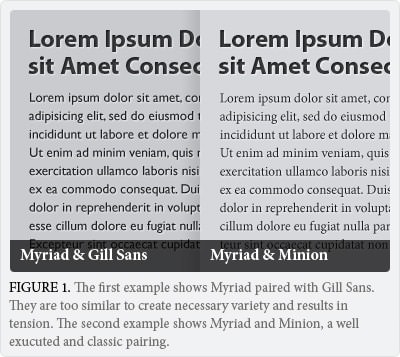 When choosing fonts for your website, focus on a primary font, used for headings and sub-headings, and a body font, used for the majority of the written copy throughout the website. Avoid using more than two or three fonts. Having more can potentially muddle a design. It’s often best to combine a serif with a sans serif. When you’re pairing multiple fonts to work together it’s crucial that you maintain both unity and variety. Fonts, like people, have personalities. And Fonts’ personalities, just like those of people, can sometimes clash. There are dozens of things to consider. For the simplicity of this article, I’ll illustrate the most important: a comparable x-height. The x-height of a typeface describes the height from the baseline (the line upon which most letters “sit”) to the upper reaches of the lower case characters. For a successful pairing, try to keep the x-height of the two proportionally similar.
Leading (or line-height)
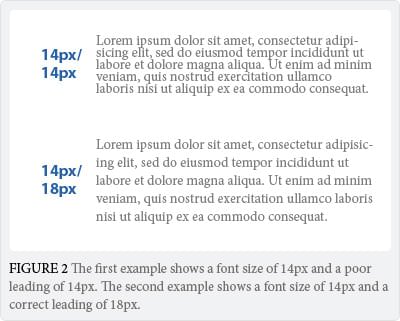 Leading is the distance, or white space, between lines of writing and plays a large role in legibility. Appropriate leading makes it easier for a reader to habitually follow the text from one line to the next. Poor leading creates discord and tension, often resulting in the reader losing their place while reading. Leading also alters the perception of white space on a website. Too little leading, and the copy looks too dense. Too much and the copy looks fragmented. Choosing your leading depends on several factors, including the font used, the size, and the style. The larger the type size, the less leading is required. Typically, the leading should be 3-6pt larger than the type size. So, if you’re font size is 14px, a 17px-20px leading should work. Taking the time to ensure you’re using appropriate leading can have a huge positive impact on the usability of your website.
Go Big, REALLY BIG
When it comes to choosing web fonts, bigger is better. Always err on the side of making things bigger, and allow yourself to scale down if necessary. Most websites are crammed with tiny text that’s a strain to read, despite all browsers defaulting to a font size of 16px. Why? It’s just a collective mistake that dates back to a time when screens were really small. 16px is the text sizes browses were intended to display. Additionally, 16px text on a screen is about the same size as text printed in a book or magazine (accounting for the average reading distance of 20-23 inches from the computer screen). The more difficult your text is to read, the less of it a user will read–and the less of what a user reads, the less of your company message will be understood. 10px is illegible, 12px is still much too small, and even 14px can be a strain for many users.
Jeffrey Zeldman, web design rockstar and proclaimed “King of Web Standards” by Business Week, recently redesigned his website with the concept of huge typography in mind. Using 24px as the default size for the body copy, Zeldman explains “this version is designed for now. I love mobile for reading and I wanted to honor the concept of ‘mobile-first’ by pushing it possibly farther than a sane designer would.” While this is a stretch for many, Zeldman is certainly pushing the needle in the direction of large typography. Anything less than 16px with today’s modern monitors is a costly usability mistake.
I’ll be following this article with a Part two in the months to come, including more useful web typography tips.